Frequently Asked Questions (FAQs)
FAQs: Live Events
Pulse 365 Live events have been running for many years. At each event, you will have the chance to choose between multiple streams of expert-led, CPD talks, whilst also benefitting from dedicated time to network with colleagues and our carefully selected exhibitors.
Access to our speakers’ presentation slides will be provided after the event, where we have permission to share them. As with your certificate, you can access the slides by following a link after completing our feedback questionnaire. You will be able to download the presentations we have been given permission to share.
Our events are designed for fully qualified healthcare professionals. If you are interested in attending as an exhibitor, please contact our business development team by emailing [email protected].
If you can no longer attend, please contact the events team at [email protected] and they will cancel your place at no charge.
Our events are only open to fully qualified healthcare professionals – unfortunately, no children or non-healthcare professionals can attend.
Should you have a baby (<1yr) and wish to bring them to the event, please contact the team to see if a provision can be made.
Should you have any further questions, please contact us on 0207 214 0555 or email us at [email protected]
Yes, please register here for any of our virtual and face-to-face events. You do not need to register for individual sessions during the events. Our events are free-to-attend.
Pulse face-to-face and virtual events are specifically designed for GMC-registered GPs only. The content that we provide is tailored to this specific job title to help improve your role.
If you are still conducting some clinical work, i.e. as a GP locum, and you have maintained your GMC registration, you are welcome to attend. If you have fully retired from the profession, we are afraid that ABPI guidelines restrict us from accepting you.
If you are a GP trainee with a valid GMC number, we would be delighted to see you at our virtual and face-to-face events. If you are a medical student or are training in secondary care, we are afraid that we cannot accept your registration.
A certificate will be provided after the event. Simply fill in the short feedback questionnaire that will be emailed to you post-event, and follow the link at the end where you can download your certificate. Certificates require self-completion for the sessions you attend.
In advance of a face-to-face event you will be asked to reconfirm attendance and submit any dietary requirements. Complimentary refreshments are provided at all events including vegetarian, and often vegan, options.
If you have any serious allergies or specific dietary needs, please contact [email protected]
Yes, please just put “00000” in the practice code field.
FAQs: Virtual Events
Access to our speakers’ presentation slides will be provided after the event, where we have permission to share them. As with your certificate, you can access the slides by following a link after completing our feedback questionnaire. You will be able to download the presentations we have been given permission to share.
Our events are designed for fully qualified healthcare professionals. If you are interested in attending as an exhibitor, please contact our business development team by emailing [email protected].
If you can no longer attend, please contact the events team at [email protected] and they will cancel your place at no charge.
Pulse 365 Virtual events will be accessible online via the Pulse 365 platform. Prior to each event starting, we will send you an email with the login process for the event. After the events have taken place, some of the sessions will be added to our On-Demand service so you can watch again or catch up at a time convenient to you. Please note, some On-Demand Webinars are available for free, whilst others are only available for Premium subscribers.
Yes, please register here for any of our virtual and face-to-face events. You do not need to register for individual sessions during the events. Our events are free-to-attend.
No, you do not need to book individual talks during the virtual event. You can login to the platform at any time of day to watch the current content being broadcast. All of our live sessions will be put on-demand once they are done so you won’t miss out on anything if you can’t make the scheduled live time. Please note, some On-Demand Webinars will be available for free, whilst others will only be available to Premium subscribers.
For the best experience, we recommend that you use either Google Chrome or Safari. Other browsers like Microsoft Edge or Internet Explorer might not handle the event platform. Please check your wifi connection. Carrying out a hard refresh (Ctrl+R) can also help to refresh your page.
Some users have reported issues when watching via a mobile device. Please ensure your operating system and browser are updated and that you accept any prompts to allow access to your microphone and camera. You will also need to 'join audio' on the webinar screen.
Yes, all of the live (non-sponsored) sessions will be added to our on-demand service once they have been broadcasted. Some will be available for free, others will only be available to Premium members.
Absolutely. We record all of our live event sessions which are then added to Pulse 365 as On-Demand Webinars. So if you are unable to attend an event on the day, you can login at any time that is convenient to you to watch content on-demand. Please note, some On-Demand Webinars are available for free, some will only be available with a Premium subscription.
Pulse face-to-face and virtual events are specifically designed for GMC-registered GPs only. The content that we provide is tailored to this specific job title to help improve your role.
If you are still conducting some clinical work, i.e. as a GP locum, and you have maintained your GMC registration, you are welcome to attend. If you have fully retired from the profession, we are afraid that ABPI guidelines restrict us from accepting you.
If you are a GP trainee with a valid GMC number, we would be delighted to see you at our virtual and face-to-face events. If you are a medical student or are training in secondary care, we are afraid that we cannot accept your registration.
This is dependent on how many sessions you watch. Each virtual event is labelled on the platform to show how many CPD hours the entire event is worth. You will need to claim the correct number of hours based on how many sessions you watch. Pulse 365 will keep a record of how many CPD hours you accrue from consuming the content available on the platform, to assist you in tracking your development.
A certificate will be provided after the event. Simply fill in the short feedback questionnaire that will be emailed to you post-event, and follow the link at the end where you can download your certificate. Certificates require self-completion for the sessions you attend.
Yes, please just put “00000” in the practice code field.
FAQs: Learning Modules
Yes, you will earn CPD credits for every module you complete, and this will be recorded on a certificate that will appear automatically in your PULSE 365 CPD dashboard. Each module has a suggested number of CPD hours. This is an estimate of the maximum time it will take to complete the module, explore the associated references and reflect on your learning as you go. But this suggested number of hours is just intended as a guide - once you have completed the module you will be asked how many CPD credits you wish to claim (based on the principle that one CPD credit = one hour's learning). This is the number of credits that will appear on your module certificate.
Some of the modules are interactive and involve you working through typical patient scenarios, making management decisions and building your knowledge as you go. In these modules, you will complete a set of multiple-choice questions (MCQs) before you start and again at the end. This will help you to gauge how your knowledge has improved.
Others involve reading articles that review all the latest evidence on the topic in question and then taking a CPD assessment that consists of answering MCQs. You will be given feedback on correct and incorrect answers together with a brief summary of the evidence base behind the correct answer. In many cases, the articles on which these modules are based have been published in Pulse magazine -; meaning that you can come to Pulse Learning to earn CPD credits for your weekly reading in Pulse.
Some modules include video links and pictures.
Whichever type of module format you choose, you will be asked to record your learning points after completing your post-module MCQs and these will be included in your module certificate. This is necessary to enable you to claim CPD credits in line with the RCGP guidance.
Each module has a suggested number of CPD hours -; the modules vary from a suggested 0.5 hours to a suggested 3 hours. This is an estimate of the maximum time it will take to complete the module, explore the associated references and reflect on your learning as you go. But this suggested number of hours is just intended as a guide - once you have completed the module you will be asked how many CPD credits you wish to claim (based on the principle that one CPD credit = one hour's learning). This is the number of credits that will appear on your module certificate.
You don't have to complete the whole module in one sitting. You can break off at any point mid-module and your progress will be automatically tracked. You can pick up again where you left off by entering the same module or by going on your 'CPD dashboard' and clicking on the module.
The latest modules are displayed on the Pulse 365 home page with a 'NEW' corner flag to highlight them.
Each Pulse 365 module that you complete is automatically recorded in your CPD dashboard. The CPD dashboard listing includes the date that you completed the module, the number of CPD credits that you have claimed, the learning points you entered after completing the module and a PDF copy of your module certificate.
You can print your certificate at any time by returning to your CPD dashboard and clicking on the PDF icon next to the relevant module.
Your certificate is automatically generated and stored in your CPD log. You can print the certificate off at any time, or save it to your computer by clicking the download icon next to the relevant module.
You can also download your certificate if you go into the module and scroll to the bottom.
All of our clinical modules are authored by UK clinicians with the needs of UK GPs in mind. Our authors may be primary care experts in the relevant field (eg. GPSIs or GP members of NICE guideline groups) or they may be hospital consultants. Each module lists the author and their credentials at the start.
All the modules on Pulse Learning have been peer reviewed by Pulse's GP advisers. Our aim is to ensure that we always provide you with modules that are practical, relevant, evidence-based and up-to-date.
Any module that is sponsored is clearly marked as such (with a 'Sponsored by' tag above its title) and the sponsor's name is stated. Sponsored modules are required to meet minimum standards of accuracy and relevance and are also peer reviewed by Pulse's GP advisers.
All other modules are commissioned by the Pulse editorial team from independent expert authors without any input or influence from any outside company or agency.
Pulse Learning CPD modules that are based on clinical articles published in Pulse will be free for an initial period after publication, giving you the opportunity to complete the CPD assessment and earn CPD credits during the free period. This period (usually two weeks) will be clearly stated at the end of the relevant article in Pulse.
Once the free period is over, the full module will be available only to premium members of Pulse Learning. However, the article on which it is based will still be available to view free. To view an article free once the module has become available only to premium members, just go to www.pulsetoday.co.uk and click on the 'Article only' link.
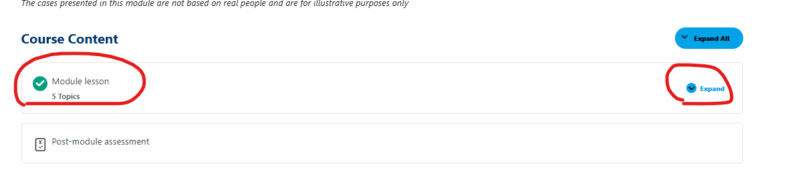
- To begin an eLearning module, scroll down to ‘Course Content’ on the module you'd like to start, and click on the module lesson to reveal each element. If there is more than one topic, you can click ‘Expand’ to reveal the lesson topics.
- Work through each topic and when you have finished, remember to click the ‘Mark Complete’ button at the bottom of the page. Then click ‘Next Topic’ to move onto the next topic.

- Once you have completed all the topics and clicked ‘Mark Complete’ on all sections, you will need to complete the post-lesson assessment to earn your certificate.
- Click the ‘Next Quiz’ button and ‘Start Quiz’ to start the assessment.

- Once you have completed the assessment, click ‘Finish Quiz.’
- Click on 'View Questions' to review the questions and answers or ‘Restart Quiz’ to take the Quiz again.

- You will need to score over 80% to receive a certificate, and ensure all sections are marked as complete.
- If you score enough to earn a certificate, you will see a button that says ‘Click Here to Continue.’

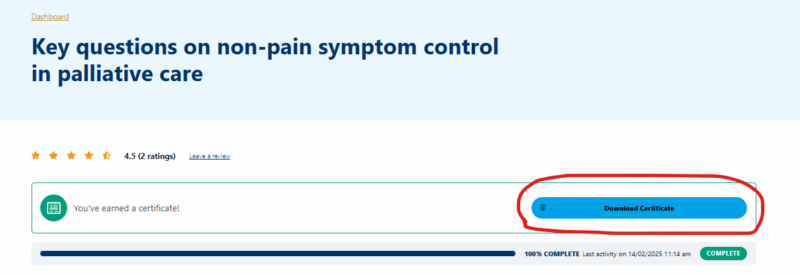
- Click this button and the certificate should now show at the top of the module, as well as in your dashboard.
FAQs: Customer Service
There are many ways in which Pulse 365 can help you to collect and record your CPD credits for appraisal and in preparation for revalidation:
- Every e-learning module that you complete will automatically earn you CPD credits that will be stored in your personal CPD dashboard.
- Our comprehensive range of more than 300 modules covering clinical, practice business and commissioning topics means you will always be able to find a module to suit your needs and fill your knowledge gap.
- Your CPD dashboard will store evidence of your CPD credits tally, all your learning points, your module certificates and your double impact credit claims (together with any supporting evidence that you upload).
- You can record any learning needs / PDP goals that you have set for yourself or agreed with your appraiser in your CPD dashboard and link individual learning modules to particular goals.
- You can include links in your CPD dashboard to learning material that you've read on other sites and want to keep a record of.
- Event attendance is recorded in your CPD dashboard, whether that is a LIVE in-person conference or a VIRTUAL event.
- All On-Demand webinars you watch on Pulse 365 will also contribute to your CPD and will be logged in your dashboard.
- Our Learning Needs Assessment test can help you to direct your learning to clinical areas where your knowledge is weaker.
- You can export all the information in your CPD dashboard into a spreadsheet that you can save for your records or email to your appraiser. You can limit this information to only include learning activity between two specified dates e.g. since your last appraisal.
You'll need to register as a free member and log in to get access to:
- Our Free CPD modules, On-Demand Webinars, Live and Virtual Events
- Your personal Pulse 365 CPD Dashboard, which will automatically keep a record of all your completed CPD modules and certificates, complete with your name, learning points and credits claimed.
For these benefits, register for a free membership today.
Yes, please click here to register for a free membership.
Click on 'Sign up' on the top right of the page to be taken to the registration form.
Your privacy is important to us and we are committed to protecting it. We will not share your information with others or pass on your personal details without your prior consent. You will not receive unsolicited emails from us or from third parties unless you have agreed to this.
We collect personal information when you join Pulse Learning or opt to tell a friend about our service. This is to help us provide a better service. We may use aggregate anonymous details about our users to sell relevant advertising space. You can read our terms and conditions for more information.
You can reset your password by clicking here. Fill in your email address and you will receive a notification with your new password.
Please wait a few minutes for the email to arrive and remember to check your junk folder.
To update your account information, please email us at [email protected].
As a free member, you can access a limited number of free modules, on-demand webinars, and our events. However, to get full access to all 300+ CPD modules, 120+ on-demand webinars, and priority access to event tickets, you will need to subscribe to a premium membership.
Our premium members get access to:
- Over 300 e-learning modules across 27 clinical areas, as well as modules covering practice business and finance
- Priority access to our Pulse LIVE and VIRTUAL events
- New modules emailed to you every week
- A personalised CPD dashboard
Go premium by clicking here
A year's full premium membership to Pulse 365 costs jut £99 (plus VAT). Don't forget that this is a legitimate tax-deductible expense for GPs.
You can also pay £12 (plus VAT) a month.
Click here to upgrade to a Premium account today.
To go Premium, make sure you are signed in. Then click ‘Upgrade’ on the top navigation or click here.
The content on Pulse 365 is tailored to meet the learning needs of UK GPs only.
You can access free eLearning Modules, On-Demand Webinars, Event tickets, and your CPD Dashboard as soon as you have registered as a member of Pulse 365.
If you can’t access the premium content straight away, please logout and log back in to refresh permissions.
You may want to think about taking the modules that are most relevant to the PDP objectives that you agreed with your appraiser at your most recent appraisal.
Alternatively, you can see the latest clinical modules displayed on the home page, or you can search for a particular module by topic or keyword. Or you may want to look at the modules in a particular clinical area by clicking on the relevant topic in the 'CPD modules' page.
Don't forget, the rebrand to Pulse 365 now gives you even more content. On-Demand webinars are regularly updated and added to the site and Premium members can watch everything on offer on the platform.
You don't need to do anything, all modules that you take on Pulse 365 will automatically be saved in your CPD dashboard -; whether you have completed them or not. You can return to your CPD dashboard at any time to see an overview of your completed modules and any modules in progress, to print your certificates, claim impact credits and upload evidence of impact documents.
You can send a request to cancel your premium subscription via your account profile or email us at [email protected].
Due to ABPI guidelines, we are only able to accept registered HCPs in the UK as subscribers to the platform. We are unable to accept any retired professionals.
Yes, please just put “00000” in the practice code field.
If you enter your password incorrectly several times, the website will block future attempts as a security precaution. The block only lasts for around 10 minutes, so if you try again after 10 minutes, you should be unblocked. Once you are unblocked, try resetting your password.
Simply click on the “lost your password” link on the login page. You will receive an email instructing you on how to reset your password. Please wait a few minutes for the email to arrive and remember to check your junk folder.
If you experience a technical issue, or notice any errors, please let us know so we can fix it as soon as possible.
Please contact us at [email protected]. If possible, include as much information as you can, including any error messages, the name of the module/specific page, a screenshot, and the device and browser you are using. This will help us to resolve potential issues quickly.
Yes, 1 CPD point is equal to 1 CPD hour. You can find more information here.
A certificate will be provided after the event. Simply fill in the short feedback questionnaire that will be emailed to you post-event and follow the link at the end where you can download your certificate. Certificates require self-completion for the sessions you attend. If you need further assistance, or haven’t received a certificate for an event, please contact [email protected].
You can change your password in your account once you are logged in by clicking ‘Manage Profile’ – ‘Security’ – ‘Password.’ Once done, press save to confirm.
- To begin an eLearning module, scroll down to ‘Course Content’ on the module you'd like to start, and click on the module lesson to reveal each element. If there is more than one topic, you can click ‘Expand’ to reveal the lesson topics.
- Work through each topic and when you have finished, remember to click the ‘Mark Complete’ button at the bottom of the page. Then click ‘Next Topic’ to move onto the next topic.
- Once you have completed all the topics and clicked ‘Mark Complete’ on all sections, you will need to complete the post-lesson assessment to earn your certificate.
- Click the ‘Next Quiz’ button and ‘Start Quiz’ to start the assessment.
- Once you have completed the assessment, click ‘Finish Quiz.’
- Click on 'View Questions' to review the questions and answers or ‘Restart Quiz’ to take the Quiz again.
- You will need to score over 80% to receive a certificate, and ensure all sections are marked as complete.
- If you score enough to earn a certificate, you will see a button that says ‘Click Here to Continue.’
- Click this button and the certificate should now show at the top of the module, as well as in your dashboard.
FAQs: Platform Overview
There are many ways in which Pulse 365 can help you to collect and record your CPD credits for appraisal and in preparation for revalidation:
- Every e-learning module that you complete will automatically earn you CPD credits that will be stored in your personal CPD dashboard.
- Our comprehensive range of more than 300 modules covering clinical, practice business and commissioning topics means you will always be able to find a module to suit your needs and fill your knowledge gap.
- Your CPD dashboard will store evidence of your CPD credits tally, all your learning points, your module certificates and your double impact credit claims (together with any supporting evidence that you upload).
- You can record any learning needs / PDP goals that you have set for yourself or agreed with your appraiser in your CPD dashboard and link individual learning modules to particular goals.
- You can include links in your CPD dashboard to learning material that you've read on other sites and want to keep a record of.
- Event attendance is recorded in your CPD dashboard, whether that is a LIVE in-person conference or a VIRTUAL event.
- All On-Demand webinars you watch on Pulse 365 will also contribute to your CPD and will be logged in your dashboard.
- Our Learning Needs Assessment test can help you to direct your learning to clinical areas where your knowledge is weaker.
- You can export all the information in your CPD dashboard into a spreadsheet that you can save for your records or email to your appraiser. You can limit this information to only include learning activity between two specified dates e.g. since your last appraisal.
Pulse 365 is an easy-to-use online CPD platform for GPs with an extensive library of high-quality modules. With a wide range of CPD events, CPD learning modules and on-demand CPD webinars to choose from, Pulse 365 enables you to learn in a way that suits your specific learning style.
Sign up for free now to begin your learning journey. With a personal dashboard, it’s never been easier to keep track of your CPD progress, so when it’s time for your appraisal, your CPD achievements can be easily exported at the click of a button.
The content on Pulse 365 is tailored to meet the learning needs of UK GPs. We aim to make all our content concise, up-to-date and relevant to everyday general practice. You can use PULSE 365 as a tool to stay on top of all the latest developments in clinical practice, business and finance and GP commissioning. Our modules, events and on-demand webinars are useful evidence-based refreshers for general use -; or you may want to link your learning to the PDP goals that you have agreed with your appraiser. Every time you take a Pulse 365 module, watch an on-demand webinar, or attend an in-person or virtual event, you will earn CPD credits in preparation for your annual appraisal.
You'll need to register as a free member and log in to get access to:
- Our Free CPD modules, On-Demand Webinars, Live and Virtual Events
- Your personal Pulse 365 CPD Dashboard, which will automatically keep a record of all your completed CPD modules and certificates, complete with your name, learning points and credits claimed.
For these benefits, register for a free membership today.
Click on 'Sign up' on the top right of the page to be taken to the registration form.
Your privacy is important to us and we are committed to protecting it. We will not share your information with others or pass on your personal details without your prior consent. You will not receive unsolicited emails from us or from third parties unless you have agreed to this.
We collect personal information when you join Pulse Learning or opt to tell a friend about our service. This is to help us provide a better service. We may use aggregate anonymous details about our users to sell relevant advertising space. You can read our terms and conditions for more information.
As a free member, you can access a limited number of free modules, on-demand webinars, and our events. However, to get full access to all 300+ CPD modules, 120+ on-demand webinars, and priority access to event tickets, you will need to subscribe to a premium membership.
Our premium members get access to:
- Over 300 e-learning modules across 27 clinical areas, as well as modules covering practice business and finance
- Priority access to our Pulse LIVE and VIRTUAL events
- New modules emailed to you every week
- A personalised CPD dashboard
Go premium by clicking here
A year's full premium membership to Pulse 365 costs jut £99 (plus VAT). Don't forget that this is a legitimate tax-deductible expense for GPs.
You can also pay £12 (plus VAT) a month.
Click here to upgrade to a Premium account today.
To go Premium, make sure you are signed in. Then click ‘Upgrade’ on the top navigation or click here.
The content on Pulse 365 is tailored to meet the learning needs of UK GPs only.
You can access free eLearning Modules, On-Demand Webinars, Event tickets, and your CPD Dashboard as soon as you have registered as a member of Pulse 365.
If you can’t access the premium content straight away, please logout and log back in to refresh permissions.
You may want to think about taking the modules that are most relevant to the PDP objectives that you agreed with your appraiser at your most recent appraisal.
Alternatively, you can see the latest clinical modules displayed on the home page, or you can search for a particular module by topic or keyword. Or you may want to look at the modules in a particular clinical area by clicking on the relevant topic in the 'CPD modules' page.
Don't forget, the rebrand to Pulse 365 now gives you even more content. On-Demand webinars are regularly updated and added to the site and Premium members can watch everything on offer on the platform.
The latest modules are displayed on the Pulse 365 home page with a 'NEW' corner flag to highlight them.
Your Pulse 365 CPD dashboard automatically records all your learning activity on the site and allows you to link it to the specific learning objectives you have set for yourself or that you agreed with your appraiser at your last appraisal.
Your Pulse 365 CPD dashboard automatically stores details of all your completed modules - together with date completed, learning points recorded, number of credits claimed and whether you have claimed double impact credits.
Your CPD dashboard also automatically stores:
- all your certificates for modules that you have completed (in PDF format, so that you can print them or save them to your own computer).
- any modules that you have started but not completed.
- any modules that you have added to your log without starting because you want to do them at a later date – these can be found in the Saved content section.
- the results of any learning needs assessment tests that you have completed.
- a tally of the total number of hours of CPD activity you have completed on Pulse 365. You can also pick your own start and end dates (eg. the period since your last appraisal) and find out how many hours' CPD you have completed on the site during that specified period.
You can also use your CPD dashboard to record details of any reading you have done on other websites that you want to include in your CPD record. Simply click ‘Record CPD Activity’ in the ‘External Activities’ section of your dashboard.
You can claim double impact credits for any piece of learning if you can show that it has had an impact on your patients or your practice. To record your claim of impact credits, click the 'Claim Impact Credits' button alongside the relevant module or article listing in your Pulse Learning log. You can upload documents (eg. patient case studies, clinical audit report, prescribing review) to your Pulse Learning log. The 'My learning needs/PDP goals' tab of your Pulse Learning log allows you to link learning that you have done to a particular learning objective or PDP goal. If you click on this tab you can input a new learning need -; this might be an objective that you have set yourself to improve your knowledge in a particular area or it could be one of the PDP goals that you agreed with your appraiser at your last appraisal. To assign a particular module that you have completed as being relevant to that learning need, click 'Assign to existing learning need' alongside that module in the 'My CPD activity' tab.
You can export all the information included in your CPD dashboard into a spreadsheet or PDF, allowing you to easily save this for your records, or email it to your appraiser. To do this, click ‘Generate CPD report. ’
Yes, in your Pulse 365 Dashboard you'll find your CPD log where there is an option to include links to education articles read on PulseToday or any other site. Simply click ‘Record CPD Activity’ in the External Activities section of your dashboard.
Due to ABPI guidelines, we are only able to accept registered HCPs in the UK as subscribers to the platform. We are unable to accept any retired professionals.
FAQs: Exhibiting and Speaking
We are always on the lookout for new speakers and ideas for the agenda. If you are interested in speaking, or would like to propose a topic for inclusion, please contact the programme manager, Aneya Sanders Email: [email protected] Telephone: (0)20 7214 0509
If you are interested in exhibiting or sponsoring, please contact the commercial director for Pulse events, Nick Hayward. Email: [email protected] Telephone: (0)20 7214 0573.
FAQs: CPD
As part of the preparations for revalidation, the RCGP has advised that all GPs should already be collecting evidence of all their CPD activity and recording the number of CPD credits they earn. This learning can be for activities that improve the GP's knowledge and skills in any area of work, so credits can be claimed for clinical CPD, finance/practice management learning, development of teaching skills and so on. The CPD credits system is part of the strengthened annual appraisal system that will underpin revalidation. This evidence of CPD credits earned will be an important part of a GP's revalidation portfolio, on which PCT responsible officers will recommend GPs for revalidation and the licence to continue practising.
By recording the hours spent doing CPD and the impact of that learning time. At its simplest, each recorded hour spent on any CPD activity (including planning and reflection time) will count as a single CPD credit. For, example completing an online CPD module for two hours would be two credits. However, the RCGP specifically states GPs cannot simply claim points without any further reflection on what they have learned and how they will use it in practice. GPs will be expected to keep evidence of the learning points gained and the relevance of the activity to their work to justify their claim of CPD credits.
According to the GMC, the roll-out of revalidation will begin in late 2012. Under the new streamlined revalidation process unveiled by the GMC in March 2011, evidence of continuing professional development (CPD) will be one of six areas of information that every doctor will be expected to present at their annual appraisal. Growing numbers of PCTs are also asking GPs to produce evidence at each annual appraisal of the number of CPD credits they have collected over the preceding year - and this trend towards more rigorous appraisal is likely to gather pace over the next couple of years, with PCTs that have been slow to strengthen the appraisal process coming under pressure to do so.
Health secretary Andrew Lansley asked the GMC to simplify its revalidation proposals to ensure the cost is proportionate to the benefits. This resulted in the new 'streamlined' proposals for revalidation that were published in March 2011. Under this system, GPs will have to produce evidence at each annual appraisal in the following six areas:
- CPD
- Quality improvement activity
- Significant events analysis
- Feedback from colleagues
- Feedback from patients
- Review of complaints and compliments.
The RCGP will be responsible for recommending the exact standards that GPs will have to meet in each of these six areas to be recommended for revalidation -; and so retain their licence to practise. The college has advised that every GP should already be collecting evidence of all their education, including hours spent so that they are up to speed and well-placed when revalidation kicks in.
GPs undergoing revalidation will be required to gain a minimum of 50 CPD credits a year or 250 CPD credits over each five-year revalidation cycle. In line with this, PCTs that have already incorporated the CPD credits system into their strengthened appraisal processes are generally asking GPs to collect evidence of at least 50 credits per year. In practice, most GPs expect to collect evidence of far more than 50 CPD credits per year to present at their annual appraisal. The first GPs to undergo revalidation will not be expected to submit a full five-year portfolio of evidence, with the number of CPD points increasing as time goes on.
There is no formal accreditation or approval system for CPD credits. Under the RCGP's guidelines, the onus is on the GP to self-assess their CPD credits. A GP's annual claim of 50 or more credits will then be verified by their appraiser at each annual appraisal. The appraiser will normally expect to see supporting information that sets out what the GP learned from each piece of CPD activity and how it's relevant to day-to-day practice. The RCGP has suggested that GPs should look to gain their 50 credits through a mix of learning formats and topics. The college is suggesting and annual maximum of 20 credits for educational meetings/conferences; 10 credits for personal unstructured reading; 10 for targeted reading; and 10 each for unstructured and structured online reading.
For any given piece of CPD, a GP will be able to double the basic hours spent by showing the learning had a specific impact on patients, their own personal development, or the health service. For example, the learning may have resulted in a change in your practice protocols for a certain disease, you may have recorded a case study where the learning changed your management, you may have been prompted to conduct a clinical audit, or your practice might have become a training practice as a result of your CPD. The RCGP advises GPs to record any time involved in CPD as basic hours-based credits and then to reflect back on that learning occasionally over the following couple of years to make a judgment on whether to claim double bonus credits for impact. Where a GP feels impact credits are warranted, he or she can record the supporting evidence alongside the basic credits claim.
The GMC website has a comprehensive section on the latest developments towards revalidation. The RCGP website has information on how the new CPD credits system works and how it fits in with annual appraisal
Yes, you will earn CPD credits for every module you complete, and this will be recorded on a certificate that will appear automatically in your PULSE 365 CPD dashboard. Each module has a suggested number of CPD hours. This is an estimate of the maximum time it will take to complete the module, explore the associated references and reflect on your learning as you go. But this suggested number of hours is just intended as a guide - once you have completed the module you will be asked how many CPD credits you wish to claim (based on the principle that one CPD credit = one hour's learning). This is the number of credits that will appear on your module certificate.
Each Pulse 365 module that you complete is automatically recorded in your CPD dashboard. The CPD dashboard listing includes the date that you completed the module, the number of CPD credits that you have claimed, the learning points you entered after completing the module and a PDF copy of your module certificate.
You can print your certificate at any time by returning to your CPD dashboard and clicking on the PDF icon next to the relevant module.
You don't need to do anything, all modules that you take on Pulse 365 will automatically be saved in your CPD dashboard -; whether you have completed them or not. You can return to your CPD dashboard at any time to see an overview of your completed modules and any modules in progress, to print your certificates, claim impact credits and upload evidence of impact documents.
Your Pulse 365 CPD dashboard automatically records all your learning activity on the site and allows you to link it to the specific learning objectives you have set for yourself or that you agreed with your appraiser at your last appraisal.
Your Pulse 365 CPD dashboard automatically stores details of all your completed modules - together with date completed, learning points recorded, number of credits claimed and whether you have claimed double impact credits.
Your CPD dashboard also automatically stores:
- all your certificates for modules that you have completed (in PDF format, so that you can print them or save them to your own computer).
- any modules that you have started but not completed.
- any modules that you have added to your log without starting because you want to do them at a later date – these can be found in the Saved content section.
- the results of any learning needs assessment tests that you have completed.
- a tally of the total number of hours of CPD activity you have completed on Pulse 365. You can also pick your own start and end dates (eg. the period since your last appraisal) and find out how many hours' CPD you have completed on the site during that specified period.
You can also use your CPD dashboard to record details of any reading you have done on other websites that you want to include in your CPD record. Simply click ‘Record CPD Activity’ in the ‘External Activities’ section of your dashboard.
You can claim double impact credits for any piece of learning if you can show that it has had an impact on your patients or your practice. To record your claim of impact credits, click the 'Claim Impact Credits' button alongside the relevant module or article listing in your Pulse Learning log. You can upload documents (eg. patient case studies, clinical audit report, prescribing review) to your Pulse Learning log. The 'My learning needs/PDP goals' tab of your Pulse Learning log allows you to link learning that you have done to a particular learning objective or PDP goal. If you click on this tab you can input a new learning need -; this might be an objective that you have set yourself to improve your knowledge in a particular area or it could be one of the PDP goals that you agreed with your appraiser at your last appraisal. To assign a particular module that you have completed as being relevant to that learning need, click 'Assign to existing learning need' alongside that module in the 'My CPD activity' tab.
You can export all the information included in your CPD dashboard into a spreadsheet or PDF, allowing you to easily save this for your records, or email it to your appraiser. To do this, click ‘Generate CPD report. ’
This is dependent on how many sessions you watch. Each virtual event is labelled on the platform to show how many CPD hours the entire event is worth. You will need to claim the correct number of hours based on how many sessions you watch. Pulse 365 will keep a record of how many CPD hours you accrue from consuming the content available on the platform, to assist you in tracking your development.
Yes, 1 CPD point is equal to 1 CPD hour. You can find more information here.